Managing daily tasks and saving more time is crucial for every busy person. The world entirely changed after the birth of Artificial Intelligence (AI). It helps people complete more challenging work in a shorter time; previously, people took a lot of time to complete their work.
With the passage of time, AI is getting more access in our daily tasks. Now, people are taking an interest to learn AI for daily tasks. Today, I explore some simple AI tools for beginners. So, learn to manage daily tasks with AI.
Day by day, the AI brings changes into our lives, whether in is IT field or any other field. So, the large companies replace jobs with AI Automation. People who can work with AI and automate tasks are in demand.
Table of Contents
Why Use AI for Daily Tasks?
Do you know that 80% of leaders use AI? If you’re still not using AI in your daily work routine, then you’re an old-aged man. An employee who works in a tech company will need to use AI. Because the AI can make things easier for him, like analysing data, building the right strategies for future growth, etc.
Even none non-coder or non-technical person can use it wisely. There are no difficult prompts you need; just write what you want and specify your questions briefly, if you’re using ChatGPT.
Learn to grow not only by earning. In the near future, time is becoming digital even robots will replace humans in the health, education system, and the agriculture field. So, learn AI to make better progress in life.
Understand Your Work Field
Understand your specifications first, because each AI chatbot has capabilities to perform accurately in a specific field. It’s AI, first, you should train it as an instructor to get the best results. Analyse what your work field is, then look at the following Tools that can help you accurately.
Also Read: 5 Practical Ways to Improve LinkedIn Profile Visibility in 2026
Learn 10 Simple Tools
Start with learning simple tools. Success lies in the little things, not the big things. At this time, OpenAI has changed the perspective on living. ChatGPT which has been the most used AI chatbot since its launch. After this, many other platforms were launched, and each has different specifications.
1. ChatGPT for Writing, Planning, Homework, and Ideas

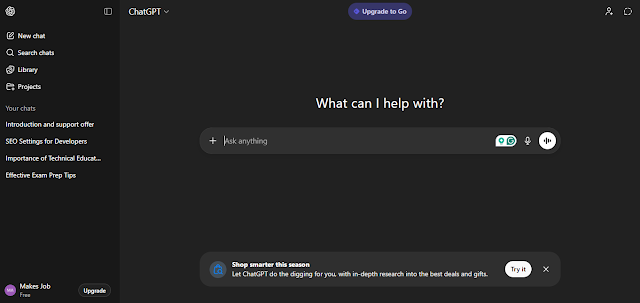
ChatGPT is used to solve daily life problems, such as when your laptop’s keyboard stops working, and you don’t know how to fix it. In this case, ChatGPT can help to resolve it. As shown in the picture. Several other problems can be solved.
Write an engaging product description; most businesses struggle to craft a product description that effectively attracts buyers. So, ChatGPT can do it within seconds, provide product details, and write an effective prompt.
Students can generate daily routine tasks. If a lazy student wants a plan for 30 days for exam preparation, just give input and get a planned preparation.
I write to ChatGPT, “My mobile is running slow, suggest quick ways to improve its performance”.

Sometimes, we don’t have ideas for something. With good accuracy, ChatGPT can give you lots of ideas in any field.
2. Notion AI – Perfect for Daily Planning

Most people create to-do lists every day. If you manage time wisely, you can finish work quickly and save more time. Time management is a crucial aspect, and people learn to do more things in a short time. As Elon Musk do, Musk build a plan to do 12 months’ work in just 6 months. How did he?
When I write, “Create a to-do list for me”. The response of Notion AI was fantastic. I have never experienced this before. Notion AI-generated to-do list as shown in the screenshot below:

Let’s learn how you can save time and do things timely. In this case, Notion AI perfect choice. It works to clean notes, create and clean documents, and create projects.
Be creative with Notion AI; it makes productive information and answers questions based on its algorithm. Sign up and select for which purpose you use it.
3. Google Gemini

I used it, and the Google Gemini boosts daily work productivity. It works on an advanced AI multimodel and generates rich context. In every Google App, Gemini has been featured to reduce the work burden.
If you use Gmail, Google Search, or any other product of Google. The Gemini make things easier for you. Gemini does help in quizzes, generates summaries for articles, and gives new ideas.
Cost: Its basic version is totally free, while the premium plan is more advanced and it can work more deeply for you.
4. Canva – Research, Design & Publish

Canva, which most used platform at this time. I love it because it has several design features with a simple interface. After the AI integration in Canva, it has boosted the results. Every YouTuber, Designer, and Video editor uses it to design things professionally.
I have been using it for the past three years for generating resumes, YouTube thumbnails and reels. As of my experience goes, Canva has different types of formats for designing ad campaigns, cover letters, and resume backgrounds and more.
Using Canva, I created a video and shared it on social media, which has received approximately 2k views in a day.

Non-experienced people can use it, create an account, and it has no credit limit in the free plan. The pro plan is also available.
5. Duolingo Max – For English Learners

People who are willing to learn the English language and boost their skills can use Duolingo for free. Learning English is powerful and necessary for every person to read, write and listen to something. Even a person who works in a foreign country needs good English for better communication.
It’s an AI-powered language Practice application which helps learners to understand things, practice and think clearly. It detects the mistake in the write-up; if a mistake is found, Duolingo identifies it and makes it correct with reasoning.
> Go to the Duolingo website or the Application (available on the Play Store).
> Click on get started or sign in (if you already have an account).
> Select a language you want to learn.
> Select “What language do you speak?”
Next:
Start learning every day, complete daily little tasks, and improve basic English grammar, vocabulary and sentences.

6. Microsoft Power BI with AI

Are you a Data Analyst? I brought this for you. The Data Analytics expert must do things accurately and correctly. Therefore, the AI-powered Microsoft Power BI, equipped with an AI tool, can clean and format dirty data.
Summarise data into charts, actionable insights, and a clear dashboard. No complex coding required, learn the basics and reduce work burden. With Microsoft Power BI, Data Analytics perform operations for businesses and identify the lack of growth, decrease in sales and analyse the data.
Sign up first:
- Sign up with your email and get access to the dashboard.
- Add details to the account
- Create password
- Start using
7. Copy.ai

For professional businesses, email writing is an important task. It is the best Email Writing AI Tool for marketers and freelancers. With ready-made templates, beginners can start working quickly. It’s a free tier only accessible with limited features.
Big companies always demand expert workers; their requirements look tough for some time. Talented worker never stop learning and boost their skill every day.
Steps to Follow:
- Open the official website
- Create an account and add details
- Choose a monthly/annual plan
- It offers premium features only
8. Lensa AI

The Lensa AI is a perfect tool for photographers; it can be used to take portrait selfies. Its features are eye correction, skin colour enhancement, and others. The AI-integrated application edits photos into high-quality size.
For Photographers, the application is a great choice. It allows editors to create custom avatars and use them. Anyone can use it for free; the LENSA AI is accessible on both Android and PC.
How to use?
- Go to the website
- Sign up using your email address
- Purchase a Pro plan to get access to all pro features.
9. Zapier

Zapier is an American company that automates business operations. It offers AI-powered tools, which can automate any kind of tasks quickly. Zapier connects more than 70,000 apps. The tool can reduce the hard work burden and make things easier to work.
It’s Zapier Capilpot is an intelligent assistant for optimisation and troubleshooting. The free Zapier version is accessible with limited credits and features. The Professional and Team Plan are just start from $29.00/ Per Month and $103.50/ Per Month.
Start Using Free:
- Create an account with your email address
- Complete a few necessary steps, and you’ll get dashboard access.
- Go to the chat section, where you see options of “Zap, Table, Interface, Chatbot, & Canvas”
Several other automation templates are already available. Zapier allows you to connect with Google Sheets, Google Docs, Shopify, ChatGPT and other platforms. For example, you upload the uncleaned data into an Excel file. Zapier automatically fix the errors and cleans the Excel file data in a simple format.
10. Grammarly – Check Grammar & Spellings

For Writers, Grammarly will become a great selection among other tools. Writing something is a regular part of everyone’s routine. A writer may not write perfectly in English and make some grammatical mistakes.
To make writing more informative, Grammarly can detect grammar mistakes automatically and solve them. Its free plan has few credits and does not detect or solve bigger mistakes. It is also helpful in checking plagiarised text.
Install Grammarly:
- To get started with Grammarly, sign up with your email.
- You have access to the free plan with limitations.
- On the home homepage, upload the document and then Grammarly detect the grammar mistakes, spelling checks, and does more detections.
The premium plan costs $12/ per month. Ensure the use of it in daily work and make clear writing and ideas.
Conclusion
As you read about the above-listed tools, each AI tool has a different approach and performance. To get successful results, first learn the tool and focus on being an expert in a specific tool, which helps you to complete daily tasks rapidly.
Every day, new tools and AI-powered platforms are launched. The entire world shifted its business to AI. They need experts who can boost business reputation as AI is in demand. Make yourself a brand, build a profile on popular social platforms and get hired globally.